You will work in a group to create a documentary film.
Use the Research Project Calculator to keep track of information and deadlines:
https://rpc.elm4you.org/assignments/6868
FILM REQUIREMENTS:
1. School appropriate topic. Here are some links to help you pick a topic:
PBS POV Documentaries: http://www.pbs.org/pov/video/search.php?search_type=classroom_clips#.U20Hl61dVbo
Points of View Reference Center: http://web.b.ebscohost.com.proxy.elm4you.org/pov/search/basic?sid=145b70f3-9650-43a4-89e0-0ebe479f80b1%40sessionmgr111&vid=2&hid=128
Desktop Documentaries: http://www.desktop-documentaries.com/documentary-ideas.html
2. A hypothesis about the topic is presented and defended.
3. Information about the topic is compiled and reported from at least 3 different online sources.
4. People are interviewed for their opinions about the topic.
5. Film contains "A-Roll" (talking people) and "B-Roll" (supporting imagery) footage.
6. Film is approximately 5 minutes long.
Friday, May 9, 2014
Tuesday, May 6, 2014
DIGITAL PHOTO: BLEND MODES AND LAYER STYLES
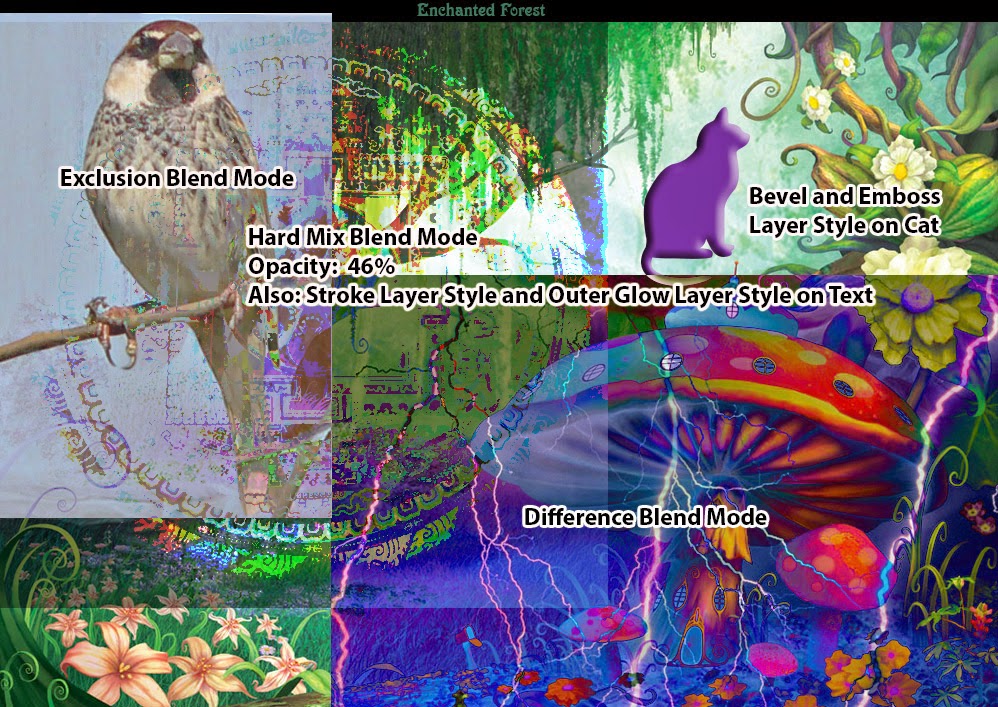
LT: I can use Blend Modes and Layer Styles to create special effects in Photoshop.
Blend Modes and Layer Styles can add interest to your Photoshop compositions.
You will need to use both techniques in your Mural Project.
The best way to learn about them is to jump in and experiment with both, you will find the effect you are looking for (and maybe also have some happy accidents!)
DIRECTIONS:
1. Find the Folder called "Blend Modes and Layer Styles" in the Hand-Out folder.
2. Watch the videos "BlendMode.swf" and "LayerStyle.swf" in the Blend Modes and Layer Styles folder. You can also use the document "LayerBrushTools.psd" as a reference and use the source images in the folder for experimenting.
2. Create a small composition where you have applied at least 3 Blend Modes and at least 3 Layer Styles. Label each with the Type Tool. Save the compositon as a JPEG, with your name in the file title and turn in to the Hand-In folder.
EXAMPLE COMPOSITION:

Monday, April 21, 2014
COPYRIGHT FRIENDLY IMAGE SOURCES
Here are some links to other websites that you can find images that are not restricted by copyright
http://search.creativecommons.org/
http://www.archive.org/
http://www.everystockphoto.com
http://sxc.hu/
http://freeres.info/
http://commons.wikimedia.org/wiki/Main_Page
http://morguefile.com/
http://search.creativecommons.org/
http://www.archive.org/
http://www.everystockphoto.com
http://sxc.hu/
http://freeres.info/
http://commons.wikimedia.org/wiki/Main_Page
http://morguefile.com/
Wednesday, April 16, 2014
DIGITAL PHOTO: 6 Photo Layout
1. Open Photoshop
2. File > New
Width: 8.5 inches
Height: 11 inches
Resolution: 300 pixels/in
3. Find the 'VIEW' menu.
4. Open the 'VIEW' menu.
5. Make sure “Rulers” has a check mark next to it.
6. Pull guides out of the rulers.
7. Put vertical Guides at: 0.25 in, 4.25 in & 8.25 in
8. Put Horizontal Guides at: 0.25 in, 3.75in, 7.25in & 10.75 in
9. Find + Download your 6 favorite pictures.
10. Resize and crop your 6 favorite pictures to be 4 in wide, 3.5 in height, 300 pixels/inch.
11. Move the pictures into the spots created by your guides.
2. File > New
Width: 8.5 inches
Height: 11 inches
Resolution: 300 pixels/in
3. Find the 'VIEW' menu.
4. Open the 'VIEW' menu.
5. Make sure “Rulers” has a check mark next to it.
6. Pull guides out of the rulers.
7. Put vertical Guides at: 0.25 in, 4.25 in & 8.25 in
8. Put Horizontal Guides at: 0.25 in, 3.75in, 7.25in & 10.75 in
9. Find + Download your 6 favorite pictures.
10. Resize and crop your 6 favorite pictures to be 4 in wide, 3.5 in height, 300 pixels/inch.
11. Move the pictures into the spots created by your guides.
Saturday, April 12, 2014
INTRO TO TECH: CREATING MLA CITATIONS
You will need to create MLA citations for the information and images you used in your brochure or poster. Since we got all of our information online, this post is only about creating citations for information and images found online. Find the situation that applies to you and follow the directions below. Use the links to go to the websites provided for information and diagrams.
How to Cite a Website in MLA
Information below taken from the following link. Go there to learn more:
Citing a website article with an author
Citation Structure:
Last, First M. “Article Title.” Title of Webpage. Name of website, Date Month Year Published. Web. Date Month Year Accessed.
Example Citation: Moye, David. "Conjoined Twins Refuse to be Separated". Huffington Post, 10 Apr. 2014. Web. 12 Apr. 2014
Link to article example citation was created from:http://www.huffingtonpost.com/2014/04/10/shivanath-sahu-shivram-sahu_n_5126123.html?utm_hp_ref=mostpopular
Citing a website with no author
Citation Structure:
“Website Article.” Title of Webpage. Title of website, Date Month Year Published. Web. Date Month Year Accessed.
Example Citation: Kindergarten
Teachers. iSeek Careers, n.d.
Web. 12 Apr. 2014
Note: If there is no article title, skip it and go straight to website title, like in my example.
Note: If there is no Date Month Year Published, write "n.d.", like in my example.
Link to article example citation was created from:
Citing a Photograph in MLA
Follow this link to see examples and find the situation that applies to you.
Citation Structure:
Description or Title. Digital Image. Title of Webpage. Name of website, Date Month Year Published. Web. Date Month Year Accessed.
Example: Cats Playing in Garden. Digital Image. Cute Cat Pictures. Dilaf, n.d. Web. 12 Apr. 2014.
Note: Most of you will not know the name of the photographer of your image, so you can follow the structure below. If you do know the name of the photographer add their name as "Last, First M." at the beginning of the citation.
Link to article example citation was created from: http://www.dilaf.com/cute-cat-pictures/
Monday, April 7, 2014
DIGITAL PHOTO: CRITIQUE TEMPLATE
Follow this link to download a copy of the Critique Template
https://docs.google.com/document/d/1NE-pHrXYJ5XIkRFarOk4WT58Swxcm3-hnHPSG-jajTk/edit?usp=sharing
https://docs.google.com/document/d/1NE-pHrXYJ5XIkRFarOk4WT58Swxcm3-hnHPSG-jajTk/edit?usp=sharing
Thursday, March 27, 2014
INTRO TO TECH: Career Exploration Brochure/Poster Assignment
PHASE 1
TIP: Use Google drive to do this assignment so you don't lose it.
http://henry.mpls.k12.mn.us/ Click on Students, then click on Student Email
You can also use the template I've shared here:
https://docs.google.com/document/d/1fzmWTLG4NdB00Mkigku_s6jvNMLxBC6c887NefFQd5Q/edit?usp=sharing
TIP: Use Google drive to do this assignment so you don't lose it.
http://henry.mpls.k12.mn.us/ Click on Students, then click on Student Email
You can also use the template I've shared here:
https://docs.google.com/document/d/1fzmWTLG4NdB00Mkigku_s6jvNMLxBC6c887NefFQd5Q/edit?usp=sharing
1. Take the Career Skills Assessment. http://www.iseek.org/careers/skillsAssessment
2. Print the results of your Career Skills Assessment
3. Look at your results. Identify at least 3 careers you would be interested in learning more about.
4. Use the iSeek website to search for information about the careers you selected. You can use the search bar located on this page of the iSeek website: http://www.iseek.org/careers/research.html
5. Give two reasons why you think each career is interesting.
6. List the average wage for each occupation.
7. List the type of education required for each career.
6. List the average wage for each occupation.
7. List the type of education required for each career.
8. List a college you could go to for it.
9. List at least two high school courses it would be helpful for you to take.
10. Once you complete this research, state which career you would be most interested in making a brochure about and give three reasons for your choice.
PHASE 2:
1. Let teacher know if you plan to make a poster or a brochure.
2. Begin additional research about career. Here is a list of required information:
PHASE 2:
1. Let teacher know if you plan to make a poster or a brochure.
2. Begin additional research about career. Here is a list of required information:
· Name of career
· Why it’s interesting
· Average Wage
· Education Required
· 3 colleges you can go for
training in that career
· The kind of degree that can
be earned at each college.
· 3 most important work
activities of job
· 3 job title examples
· 2 most important working
conditions or physical demands
· 3 additional facts about the career or career field.
· Shows 5+ pictures related
to the job
· Career Information comes
from at least 4 sources.
· Sources will be cited using
MLA format.
Here are some good career information websites:
Subscribe to:
Posts (Atom)